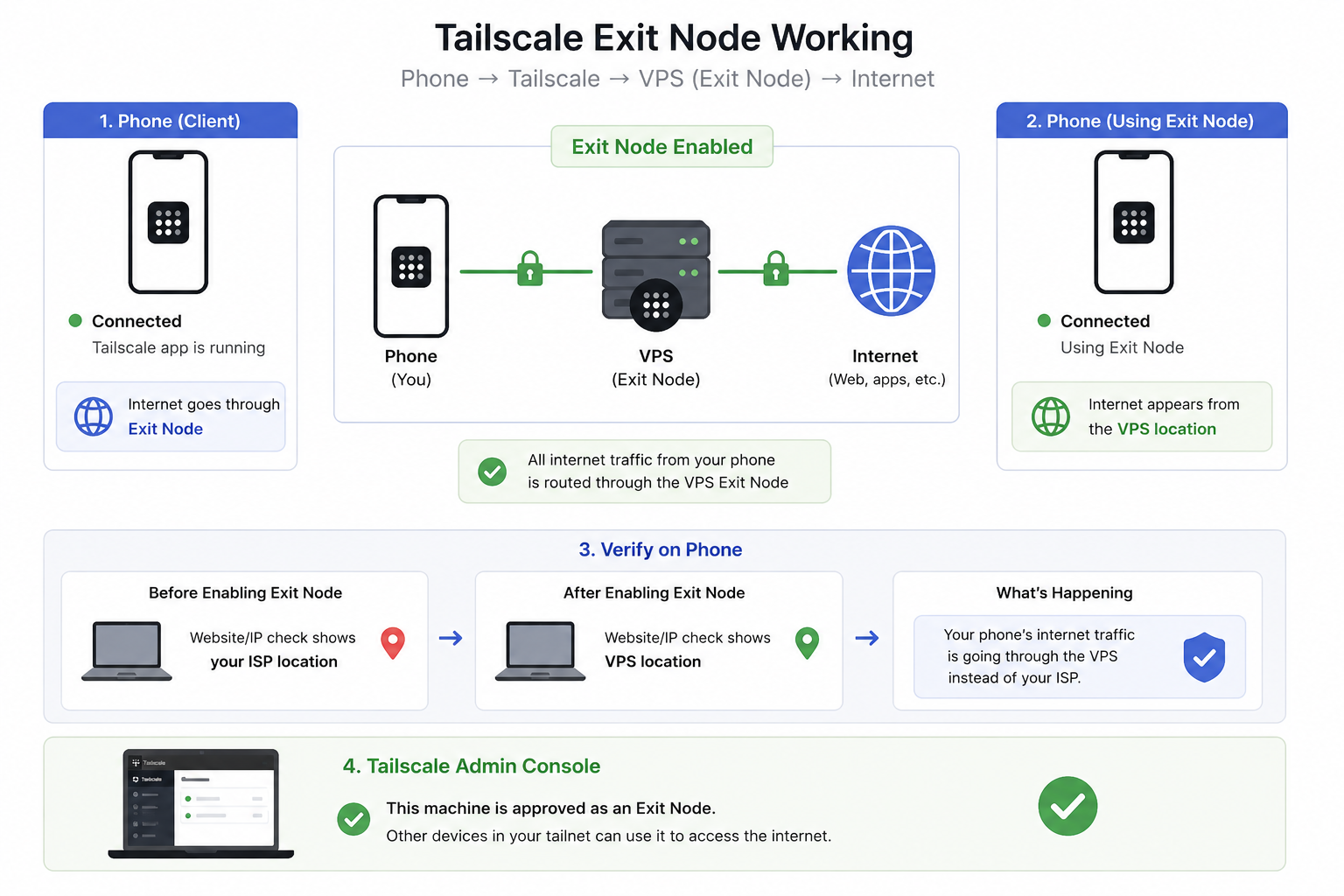
A Tailscale Exit Node allows a device in your Tailscale network to act as a gateway for internet traffic from other devices.
Normally, Tailscale only routes traffic destined for devices inside the tailnet. When an Exit Node is enabled, a client can choose to send all internet traffic through a selected Tailscale device.
This effectively turns that device into a private VPN server.
How Tailscale Normally Works
Without an Exit Node:
Phone
  │
  ├── Internet traffic ──► ISP ──► Internet
  │
  └── Tailscale traffic ─► VPS (100.x.x.x)
Only traffic destined for devices in the tailnet uses Tailscale.
Examples:
- SSH to a VPS
- Access a private database
- Reach internal web applications
Regular internet traffic continues to use the local ISP.
How an Exit Node Works
With an Exit Node enabled:
Phone
  │
  ▼
Tailscale Tunnel
  │
  ▼
Exit Node (VPS)
  │
  ▼
Internet
All internet traffic is routed through the selected Tailscale device.
Websites and services see the public IP address of the Exit Node rather than the client device.
Common Use Cases
Accessing Region-Restricted Services
India Phone
    │
    ▼
Germany VPS (Exit Node)
    │
    ▼
Service
Traffic appears to originate from Germany.
Bypassing Local Network Restrictions
If a local ISP blocks or throttles a service:
Phone ──X──► Service
Using an Exit Node:
Phone
  │
  ▼
Tailscale
  │
  ▼
VPS
  │
  ▼
Service
The service is reached through the VPS network.
Secure Public Wi-Fi Usage
Coffee Shop Wi-Fi
       │
       ▼
Encrypted Tailscale Tunnel
       │
       ▼
Exit Node
       │
       ▼
Internet
All traffic remains encrypted between the client and Exit Node.
Example: Telegram Access
Suppose:
- Telegram access is unreliable on a local network.
- A VPS in Hetzner has unrestricted internet access.
- Both the phone and VPS are connected to Tailscale.
Without an Exit Node:
Phone ──► ISP ──► Telegram
With an Exit Node:
Phone
  │
  ▼
Tailscale
  │
  ▼
Hetzner VPS
  │
  ▼
Telegram
Telegram sees the VPS IP address instead of the local network IP.
Enabling an Exit Node
On the VPS
Advertise the node as an Exit Node:
sudo tailscale set --advertise-exit-node
Verify:
tailscale status
The device should appear as an available Exit Node.
Approving the Exit Node
- Open the Tailscale Admin Console.
- Navigate to Machines.
- Select the VPS.
- Approve the advertised Exit Node capability.
Using an Exit Node
Android
- Open Tailscale.
- Connect to the tailnet.
- Open settings/menu.
- Select Use Exit Node.
- Choose the VPS.
iPhone
- Open Tailscale.
- Connect to the tailnet.
- Select Exit Node.
- Choose the VPS.
Linux
sudo tailscale up --exit-node=<TAILSCALE_IP>
Example:
sudo tailscale up --exit-node=100.x.x.x
Disable:
sudo tailscale up --exit-node=
Verifying Traffic Routing
Check the public IP before enabling the Exit Node:
curl ifconfig.me
Enable the Exit Node and check again:
curl ifconfig.me
The returned IP should now be the public IP of the VPS.
Performance Considerations
Advantages
- Private VPN without exposing services publicly.
- End-to-end encrypted traffic.
- Access to services through another network location.
- Simple setup compared to traditional VPN solutions.
Disadvantages
- Increased latency.
- Additional bandwidth consumption on the Exit Node.
- All internet traffic depends on the Exit Node's availability.
- VPS network costs may increase.
Exit Node vs Direct Tailscale Access
Direct Tailscale Access
Phone ──► VPS (100.x.x.x)
Use when:
- Accessing internal services.
- SSH access.
- Private web applications.
- Databases.
Exit Node
Phone ──► VPS ──► Internet
Use when:
- Routing all internet traffic through the VPS.
- Accessing services from another geographic region.
- Working around local network restrictions.
- Securing traffic on untrusted networks.
Example Setup
Current VPS:
Tailscale IP: 100.x.x.x
Public IP:    Hetzner VPS
Enable Exit Node:
sudo tailscale set --advertise-exit-node
Connect from phone:
Phone
  │
  ▼
Tailscale
  │
  ▼
100.x.x.x
  │
  ▼
Internet
All internet traffic from the phone now exits through the Hetzner VPS.