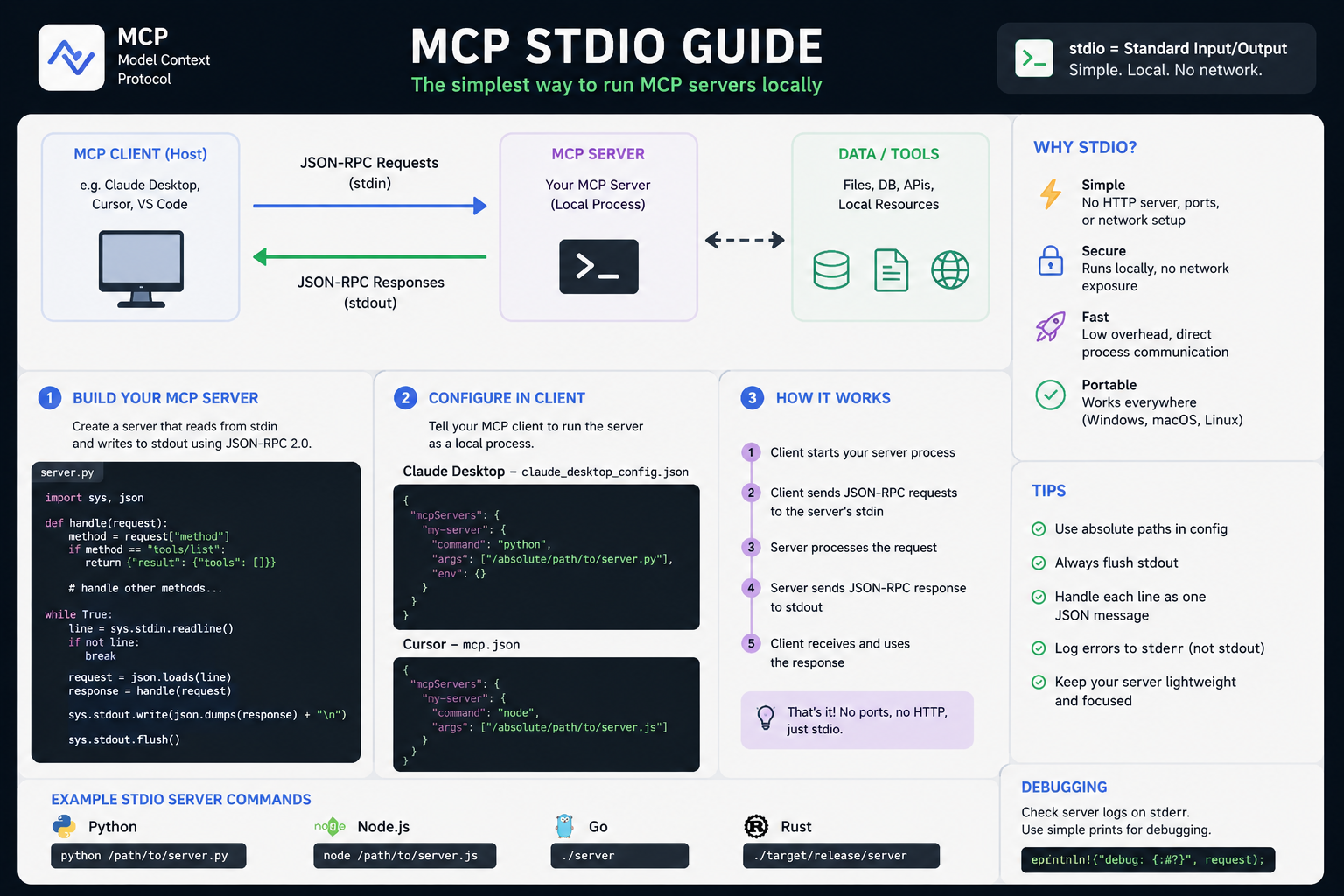
Protocol vs harness
| Layer | Who defines it | What it says |
|---|---|---|
| MCP spec | modelcontextprotocol.io | Transports (stdio, Streamable HTTP), message shapes (initialize, tools/list, tools/call), lifecycle of a session |
| Harness / host | Hermes, Claude Code, Codex, Cursor, etc. | When to spawn, reconnect policy, env filtering, tool naming, whether all tools are pushed into the prompt at once |
Stdio in the spec (shared by everyone):
- The client launches the MCP server as a subprocess.
- The server reads JSON-RPC / MCP messages from stdin.
- The server writes responses and notifications to stdout.
- stderr is typically for logs (not protocol), so servers must not print protocol noise to stdout.
That pattern is the same whether the host is Hermes, Claude Desktop, Claude Code, Codex, Cursor, or a custom app.
  Host (Claude Code / Codex / Hermes / Cursor / …)
       |
       |  spawn: command + args (+ env)
       v
  MCP server process (npx …, uvx …, binary, …)
       |
   stdin  <--- JSON-RPC requests  (initialize, tools/list, tools/call, …)
   stdout ---> JSON-RPC responses / notifications
Shared mental model (all major harnesses)
1. Config names a command (stdio) or a URL (HTTP)
| Transport | Typical config | Who runs what |
|---|---|---|
| Stdio | command + args (+ env) | Host spawns local process |
| HTTP / Streamable HTTP | url + headers / OAuth | Host connects over network |
Hosts use different file formats and CLIs, but the idea is the same:
| Host | Config surface (examples) |
|---|---|
| Hermes | ~/.hermes/config.yaml → mcp_servers: / hermes mcp add |
| Claude Code | Project / user MCP config; claude mcp add (and docs under code.claude.com) |
| Claude Desktop | claude_desktop_config.json → mcpServers |
| Codex | ~/.codex/config.toml → [mcp_servers.<name>] / codex mcp add |
| Cursor | MCP settings / .cursor/mcp.json (product-specific UI) |
2. Connection time ≈ discovery time
Almost all hosts, when they connect to a server:
- Start stdio process or open HTTP session
initializehandshaketools/list(and often resources/prompts)- Expose tools to the model under some naming scheme
So the subprocess is not typically “only forked at the exact moment the model decides to call a tool for the first time.” The host needs tools/list before the model can choose a tool.
3. Tool calls reuse the connection
After discovery, tools/call messages go over the same stdio pipes (or HTTP session). One long-lived process per configured server is the intended happy path — not a new process per call (unless a host bug or idle policy kills it).
4. Shutdown
For stdio, clean host behavior is roughly:
- Close the server’s stdin (or send a close signal)
- Wait for exit
- SIGTERM / SIGKILL if it hangs
Hosts vary in quality here (orphaned MCP processes have been real bugs in some clients).
Lifecycle: what is usually true
Host starts session / agent process
  → for each enabled MCP server:
       spawn (stdio) or connect (HTTP)
       initialize + tools/list
       register tools for this session
  → chat loop:
       model may call MCP tools
       host forwards tools/call on existing connection
  → session end / reload / idle timeout:
       disconnect; stdio child should exit
| Question | Typical answer across hosts |
|---|---|
| Process starts on first user message that needs MCP? | No — usually at session/agent start (or when that server is first enabled/connected) |
| New process for every tool call? | No (intended); reuse connection |
| Tools known before the model runs? | Yes — after discovery |
| Same for HTTP? | Connect + discover at start; no local child for pure remote servers |
Where harnesses differ (important)
Same protocol, different product policies.
Hermes Agent
- Reads
mcp_serversfrom config at agent/tool init. - Spawns stdio children (or connects HTTP) during discovery.
- Connections are long-lived for the agent process; reconnect with backoff if a link drops.
- Tools named like
mcp_{server}_{tool}(runtime may show double-underscore forms). - Stdio env is filtered (safe baseline + explicit
env:only) — good security default. /reload-mcpor new session after config changes.- Catalog:
hermes mcp catalog/hermes mcp install <name>. - Can also run as a server:
hermes mcp serve.
Docs: https://hermes-agent.nousresearch.com/docs/user-guide/features/mcp
Claude Code / Claude Desktop
- Same stdio idea: host launches
command+args, pipes stdin/stdout. - Claude Code sets project-related env (e.g. project dir) for local servers so paths resolve.
- Idle / reconnect policies differ by transport (product docs describe idle windows for HTTP/SSE vs stdio).
- Stdio servers are local processes; reconnect behavior is not always identical to remote HTTP servers.
- Community reports: process recycle between tool calls or sub-agents can break stateful MCP servers; orphaned processes on exit have also been reported in some versions.
- Scaffolding: skills/commands that help build HTTP or stdio servers.
Docs: https://code.claude.com/docs/en/mcp
OpenAI Codex
- Stdio via TOML:
[mcp_servers.my-tool]
command = "npx"
args = ["-y", "some-mcp-server"]
env = { "API_KEY" = "value" }
- CLI:
codex mcp add …; also Codex as MCP server over stdio for other hosts. - Env in the server block is passed into the child at launch (additional env, not necessarily your full shell).
- Desktop GUI + marketplace for some servers; manual
config.tomlfor custom/local tools. - Historical note: remote HTTP support lagged stdio in some Codex builds — check current docs for Streamable HTTP / OAuth.
Docs: https://developers.openai.com/codex/config-reference
Cursor (and similar IDEs)
- Same stdio/HTTP config pattern in product MCP settings.
- Classic pain: many servers → large tool schemas in context, slower start.
- “Lazy loading” in Cursor / Claude Code discussions often means: keep tool definitions out of the model context until needed (tool search), not always “don’t spawn the process until first call.”
- Some hosts still start servers early but only inject a subset of tools into the prompt.
Lazy loading (ecosystem trend)
| Kind of lazy | Meaning | Who cares |
|---|---|---|
| Lazy process | Don’t spawn until first use | Saves RAM/startup; rare as default in main coding agents |
| Lazy tool schema | Don’t put every tool schema in the LLM context until searched/needed | Saves tokens; Cursor / Claude Code / proxies |
| Proxy lazy | One meta-MCP (search_tools / execute_tool) that loads real servers behind it | DIY scale-out |
MCP’s core design assumed connect → list tools → expose. Lazy schemes are host or proxy features on top of that.
Stdio vs HTTP (all hosts)
| Stdio | HTTP / Streamable HTTP | |
|---|---|---|
| Process | Local child of the host | Remote (or local HTTP) service |
| Transport | Pipes | Network requests |
| Auth | Usually env vars for the child | Headers, OAuth, API keys |
| Isolation | Per-host, per-machine | Shareable across users/machines |
| Debugging | Attach to child, watch stderr logs | HTTP logs, tokens, CORS |
| Offline | Works offline if the tool is local | Needs network |
Rule of thumb: local filesystem, git helpers, OS tools → stdio. SaaS / team shared tools → HTTP.
Security (general + Hermes)
General
- Stdio servers inherit whatever env the host chooses to pass — treat every MCP package as code execution on your machine.
- Prefer least privilege tokens (read-only GitHub, scoped DB roles).
- Scope filesystem servers to a project root, not
/or full$HOME. - Don’t put secrets in args that end up in process lists / logs if you can use env instead.
Hermes-specific
Hermes filters stdio env: baseline (PATH, HOME, …) + only keys under env:. Full shell secrets are not auto-injected.
mcp_servers:
  github:
    command: npx
    args: ["-y", "@modelcontextprotocol/server-github"]
    env:
      GITHUB_PERSONAL_ACCESS_TOKEN: "ghp_..."
Error text is also scrubbed for common credential patterns before the model sees it.
End-to-end example (same server, three hosts)
Server: uvx mcp-server-time (stdio).
Hermes
hermes mcp add time --command uvx --args mcp-server-time
hermes mcp test time
# new session or /reload-mcp
# ~/.hermes/config.yaml
mcp_servers:
  time:
    command: uvx
    args: [mcp-server-time]
    enabled: true
Codex
# ~/.codex/config.toml
[mcp_servers.time]
command = "uvx"
args = ["mcp-server-time"]
Claude-style JSON (Desktop / many tutorials)
{
  "mcpServers": {
    "time": {
      "command": "uvx",
      "args": ["mcp-server-time"]
    }
  }
}
Same binary, same pipes — different config files and host process trees.
Hermes CLI cheatsheet
pip install mcp                    # required for Hermes MCP client

hermes mcp add NAME --command … --args …
hermes mcp add NAME --url https://…
hermes mcp list
hermes mcp test NAME
hermes mcp configure NAME
hermes mcp remove NAME
hermes mcp catalog
hermes mcp install <catalog-name>
hermes mcp serve                   # Hermes as MCP server for other clients
In chat: /reload-mcp after config changes. If tool calls return connection errors (e.g. ClosedResourceError), new session after reload.
Troubleshooting (any host)
| Symptom | Checks |
|---|---|
| Tools never appear | Server failed to start; bad command/PATH; host needs restart |
command not found | npx / uvx / binary not on PATH for the host’s environment (GUI apps often have a thinner PATH than your terminal) |
| Works in terminal test, fails in app | Different env/PATH/cwd; missing env keys in config |
| Stateful server loses session | Host recycled stdio process (version bug or intentional restart policy) |
Orphan node/uv processes | Host didn’t kill children on exit — kill manually; update host |
| Huge context / slow start | Too many MCP tools loaded eagerly — disable servers or use host tool-search / fewer servers |
| First call very slow | npx -y / uvx cold download; later calls reuse process |
Diagram: one tool call
User: "What time is it in Tokyo?"
        │
        v
┌───────────────────┐
│ Host agent loop   │  Hermes / Claude Code / Codex / …
│ (has tool schemas │
│  from tools/list) │
└─────────┬─────────┘
          │ tools/call  get_current_time(timezone=Asia/Tokyo)
          v
┌───────────────────┐
│ Stdio pipes       │
│  host stdin/out ↔ │
│  server stdin/out │
└─────────┬─────────┘
          v
┌───────────────────┐
│ mcp-server-time   │  (spawned earlier at connect)
│ returns datetime  │
└─────────┬─────────┘
          │
          v
    Model formats answer for user
Takeaways
- Yes — other harnesses work the same way at the protocol level: host spawns stdio MCP servers (or connects HTTP), discovers tools, calls them over a long-lived session.
- Do not assume every product starts the process at the exact same moment or never restarts it; check that host’s docs for idle timeouts, reload, and sub-agent isolation.
- “Lazy MCP” usually means lazy tool schemas in the prompt, not a different wire protocol.
- Hermes matches the common model: connect + discover at agent start, long-lived stdio children, filtered env,
mcp_*tool names, CLI + catalog.
Links
| Resource | URL |
|---|---|
| MCP transports (spec) | https://modelcontextprotocol.io/specification/2025-03-26/basic/transports |
| Hermes MCP | https://hermes-agent.nousresearch.com/docs/user-guide/features/mcp |
| Hermes MCP config reference | https://hermes-agent.nousresearch.com/docs/reference/mcp-config-reference |
| Claude Code MCP | https://code.claude.com/docs/en/mcp |
| Codex config | https://developers.openai.com/codex/config-reference |
| Server directories | https://mcpservers.org/ , https://mcp.so/ , https://github.com/modelcontextprotocol/servers |